When Screens Meet Science Benches
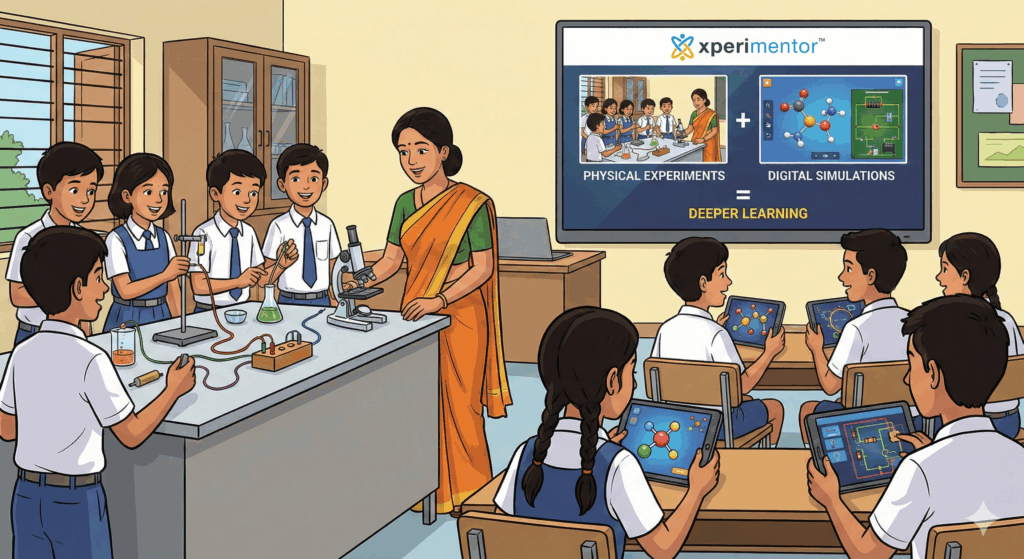
Walk into any modern classroom today and you’ll see two worlds coexisting-students peering into test tubes on one bench, and others swiping through simulations on a tablet. For educators, this raises a big question:
Are digital tools enhancing learning, or quietly replacing the joy of hands-on experimentation?
The truth is, learning doesn’t have to be a choice between screens and science benches. When used thoughtfully, using simulations and apps to enhance rather than replace-physical experiments can create deeper understanding, spark curiosity, and build scientific thinking skills that last far beyond the classroom.
This blog explores best practices for blending digital simulations with real-world experiments without losing the magic of doing science by hand.
Why Physical Experiments Still Matter (and Always Will)
Before we dive into apps and simulations, let’s get one thing clear: physical experiments are irreplaceable.
When students:
Feel the resistance of a spring
Smell a chemical reaction
Adjust a circuit wire and watch a bulb glow
They’re not just learning concepts, they’re building intuition, observation skills, and confidence.
Hands-on experiments:
Develop motor and practical skills
Encourage trial, error, and iteration
Teach students how real-world variables behave
At Xperimentor, physical experimentation is at the heart of learning. But we also recognize that real learning deepens when students understand the “why” behind what they see.
That’s where simulations come in.
The Role of Simulations: Seeing the Invisible
Simulations and educational apps shine when they help students visualize what can’t be easily seen or repeated in real life.
They are especially powerful for:
Visualizing microscopic or abstract concepts (like molecular motion or forces)
Running experiments that are unsafe, expensive, or time-consuming
Allowing repeated trials without material constraints
Instead of replacing experiments, simulations can act as:
The key lies in how we use them.
Best Practices for Blending Simulations with Physical Experiments
1. Start with Curiosity, Not the App
Begin with a question, a problem, or a phenomenon-not a screen.
For example:
Let students predict outcomes first. Then use simulations to test ideas before or after the hands-on experiment.
This ensures technology supports thinking not shortcuts it.
2. Use Simulations as Pre-Lab Warm-Ups
Before students touch lab equipment, simulations can help them:
At Xperimentor, curriculum-aligned digital quests often prepare students for physical tasks by helping them explore scenarios virtually so when they reach the bench, they’re confident and curious.
3. Keep the Experiment Real, the Explanation Digital
A powerful approach is:
After students observe results with their own hands, simulations can:
Break down processes step-by-step
Show what’s happening at a molecular or conceptual level
Help students connect observations to theory
This sequence preserves the authenticity of experimentation while deepening understanding.
4. Encourage Comparison and Reflection
Ask students to compare:
What they observed physically
What the simulation showed
Where the results matched—or didn’t
This builds critical thinking and helps students understand real-world variability-something no perfect simulation can replicate.
Xperimentor’s learning approach emphasizes reflection and questioning, ensuring students don’t just do experiments but also think like scientists.
5. Let Students Create, Not Just Consume
The best learning happens when students:
Use apps that allow exploration and experimentation, not passive watching. Pair this with physical prototyping wherever possible-mirroring how real scientists work today.
How Xperimentor Bridges the Digital Physical Gap
Xperimentor is built on a simple belief: learning happens best when students experience science, not just study it.
By combining:
Xperimentor ensures technology enhances learning without overshadowing real-world exploration. Students don’t replace experiments with screens-they use screens to understand their experiments better.
This balance prepares learners for a future where science, technology, and problem-solving go hand in hand.
It’s Not Screen vs. Science: It’s Screen and Science
The future of education isn’t about choosing between digital tools and hands-on learning. It’s about using each where it adds the most value.
When educators intentionally focus on using simulations and apps to enhance rather than replace physical experiments, classrooms become spaces of curiosity, experimentation, and meaningful discovery.
If you’re looking to create learning experiences that blend the best of both worlds, Xperimentor is here to help.